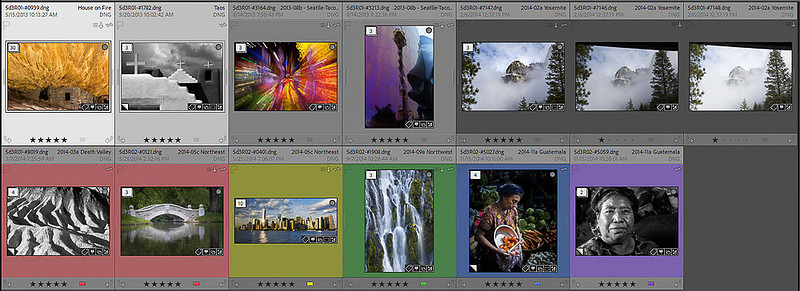
LR015 - Grid Cell ShadingLR014 - Grid/Filmstrip Cell ShadingV2 - 3/17/2025 - Added info on stacked vs unstacked images when using color labels Canvas Color and ShadingThe grid itself (in the central section) contains a wealth of information (depending on your customization preferences). Each image is in a rectangular cell. The canvas (background) of each cell is used to optionally show selected metadata about each photo. The color or shade of gray of the canvas areas are used to convey additional information.
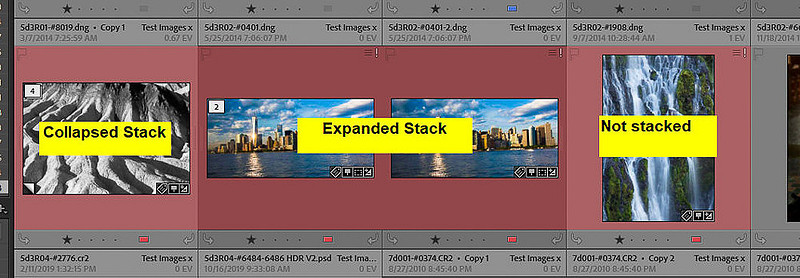
Images with Color Labels
In addition, if the image is part of an expanded stack, the color is a bit darder than if the image is the top image of a collapsed stack or not stacked at all.
Gray Canvas Shading Meaning
1) White - active 2) Very Light Gray - also selected 3) Medium Light Gray - not selected, mouse over, not expanded stack 4) Medium Gray - not selected, no mouse over, not expanded stack 5-6) Dark Gray - not selected, expanded stack
Posted 4/19/2022
Keywords:
DanLRBlog,
DanLRTip,
Grid View Canvas colors,
Grid View Canvas Shading,
Grid view Shading,
Lightroom Classic,
Lightroom Classic Grid view,
Lightroom Classic Grid view shading,
Lightroom Classic Stacks,
Lightroom Classic Tips,
LrC Stacks,
LrC Tips,
LrC`,
Shades of gray,
Shades of gray in Grid view,
Stacks`
Comments
No comments posted.
Loading...
|
Subscribe
RSS
Recent Posts
LR024b - LR/Classic & LR/Cloud KEYWORD Sync Behavior
LR031 - 15 Things New LrC Users Should Know
RT-66 Then and Now
LR030 – Cleaning Up Folder Mess
LR029b - Scanning Family Archive Film Based Images Part 2
LR029a - Scanning Family Archive Film Based Images Part 1
LR028 - Sharing LrC Collections on the web with feedback
LR027 - Clear LR Cloud and start over with syncing
LR026 - Fixing Sync Problems caused by switching the Sync Catalog
LR025 - LR/Classic (LrC) & LR/Cloud (Lr) Change Sync Catalog
Archive
January
February
March
April
May
June
July
August
September
October
November
December
|