LR029b (V01) – Scanning the Family Film Archive (Part 2)
DOCUMENT CHANGE LOG
V01 – LrC/15.0 - 2025-11-12
New Blog
TABLE OF CONTENTS
========== PART 1 =============
INTRODUCITON
WHAT TO SCAN AND WHAT TO TOSS (Culling)
SCANNING DEVICE
Copy Stand / light table
Film Scanner
Flat bed scanner
FILE TYPE
RESOLUTION
DATES
Fuzzy Dates
Setting the capture date/time
FOLDERS
IMAGE FILE NAMES
USE OF METADATA TO RETAIN OTHER INFORMATION
Scan the Written Text
Keywords (and Collections)
Titles and Captions
Film Metadata
END OF PART 1
========== PART 2 =============
INTRODUCITON
DOCUMENTS
DEALING WITH DUPLICATES
INVOLVING OTHERS IN YOUR PROJECT
DO YOU STILL KEEP THE PRINTS/SLIDES/NEGATIVES
SHARING THE RESULTS
ARCHIVING THE RESULTS FOR FUTURE GENERATIONS
Legal Considerations
Physical Storage Media
Online Archive
COUPLE OF LAST MINUTE TIPS
AND THE LIST GOES ON
FINAL COMMENT
This is part 2 of a 2 part article discussing ideas, tips and techniques for a family archive image scanning project. You can see part 1 HERE
So, what do you do with documents you stumble across? Many times these are as worthwhile to keep a record of as the images. This includes things like birth, death, and marriage certificates. Also things like immigration and naturalization papers, discharge from the military documents, census pages which include ancestors, newspaper clippings, family tree diagrams, and the list goes on. These should be scanned and labeled just the same as images
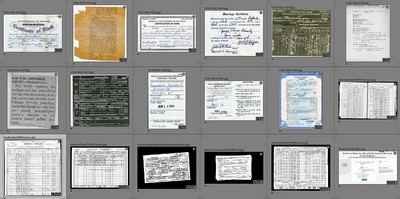 16 Documents
When dealing with scanned images we many times wind up with multiple scans of the same image. You may find the same image as a negative in a shoe box, showed up on a Kodak CD from when the film was developed at the drugstore, you may have a mid sized paper print found in a photo album, a small print found in a bin in the attic, and from a framed print hanging on the wall of dad’s house. What makes these duplicates particularly difficult to match up include:
- Date/time in metadata after scanning is date scanned not date taken
- Some may be in color and others may be in B&W
- Pixel counts will be different from different scans
- Some of the prints may have been cropped in different ways over the years
- Some may have notes written on image itself
- When you requested that family members send you old photos for your scanning project, you may get the same image (in different forms) from more than one family member.
- Different versions of the same image may have degraded in different ways (dust, scratches, fading, color shifts, rips & tears, sloppy trimming, Etc.
It is best to purge duplicates early in the project (keeping the best of course) rather than later but in that process accumulate the notes from all the versions onto the one you decide to keep.
If you are pretty sure of the year it was taken (like a birth or wedding) that can help narrow down the search of duplicates. But, no matter how you slice it, we are down to detecting duplicates using only visual content of the image. If you don’t have too many scanned images to choose from, this can be done just by looking but if you’re reading this you probably have way more images than can be practically de-duped manually. So, we scan them all and then look to technology to help us match up the duplicates.
There are way too many 3rd party programs on the market that can perform “Visual Similarity” duplicate detection. Some are better than others. Some advertise ‘LrC integration’ which usually just means that they can find images to review by looking at your LrC catalog or that they have some way to pass the results back to LrC.
The way these tend to work is that you tell the program what folders or drives to look at. The program then takes each image and internally converts it to a small monochrome jpg. Many of these programs allow you to choose how small, but we’re usually talking no more than a hundred or so pixels on the long edge. The larger these small images are the more precisely they will have to match to be considered duplicates. Some of these programs will automatically rotate and/or flip images while looking for matches.
Pretty much all these programs present the results in some manner that shows groups of images it has identified as potential duplicates and they allow you to choose which to “keep”. To me, how it presents those groups is one of the most important factors in selecting which program to get. For example, I want to see the pixel dimensions and folder location for each image in each group of potential dups.
Here is what a couple of the products look like (I’m not necessarily recommending these)
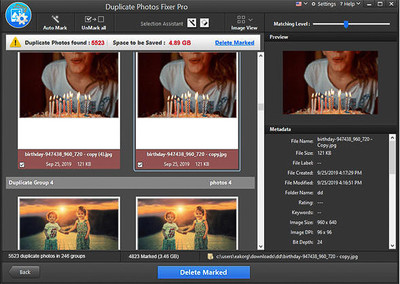 17 Dup Photo Fixer Pro
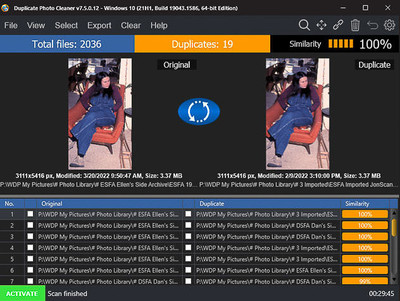 18 Dup Photo Cleaner
The next thing that is important in selecting which such program to use are the options it gives you for how to deal with the keepers vs. the tossers. Most of the programs have an option to delete, rename or move the duplicates. This may or may not be a good thing if these duplicates are in your LrC catalog as LrC will show them as “missing” (which may be OK or not depending on your workflow). Remember, in the LrC catalog you may have different notes attached to different scans of the duplicate images that should be consolidated onto the one being kept (I haven’t found a de-dup program that can do that consolidation automatically). Most of these programs also allow you to mark the keeper vs. the tosser in some way. If that includes adding data which can find its way back into the LrC catalog – that is best.
One feature I want to see in these programs that I have yet to find is more control over what folders to compare with what other folders. Most just compare ALL images in ALL selected folders to ALL other images in those same folders. I’d like to tell it to take images in folder A and look for dups in folder B (i.e. Don’t look for dups also in folder A).
Try several of these programs using their “free trial” option and decide which will work best for you.
As of LrC/15.0, a new feature was added as part of Assisted Culling that will stack images using visual similarity. This can be useful to some degree but there are limitations. For example, to do this in the Library Module all the images must be in the same folder or collection. While interesting and useful on a small scale, I don’t see this as viable substitute for a good 3rd party program.
A scanning project is many times a collaborative effort. I’m not talking about the physical scanning part (which could be distributed among family members, but usually due to equipment availability and skill level, this is just you). I’m talking about gathering information about the scanned photos so that folks down the road will be able to make sense of them when you’re long gone. As we’ve discussed there may be stuff written on prints, film cans or photo album margins but many times the best information is in the heads of other family members. This is especially true for identifying who various people in the images are (or might be) but also extends to when and where information.
In most cases these sources of knowledge are scattered all over the country if not the world making a sit down in your kitchen with all the prints impractical. While possible to do using email or paper mail this is also generally not practical. We need a way to post images on the internet in such a way that designated people can see them along with your notes and then have a way to have their notes and ideas come back to you so that you can get that info added to the images in LrC.
One way of doing this is to use some commercial photo sharing website or your own website. If you choose this route make sure that:
- The web site retains and can display the information you already have. Most folks use Title and Captions for this as that is the most likely to be carried into these web sites. But, picking a site that can also show keywords on images is important as well.
- Allows the viewers to add their own notes
- Provides some way to let you know when someone adds information.
- And, very importantly, that you can identify which image in LrC they provided those notes for. For example, most social media photo albums no longer have the original file name of the image file you uploaded to the site.
These requirements rule out most social media solutions and many popular photo sharing sites. For example
My notes in LrC
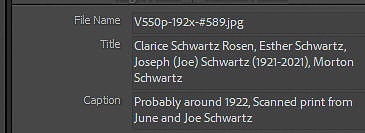 21 Title & Caption in Metadata Panel
Here’s the same info in Google Photos. Notice that “Title” did not come across, the caption showed up in “Other”, none of the keywords showed up and there is no way for others to add their own notes. It looks like users could add a description but it is not clear how you would be notified that a description was added or if that description could come back to your computer.
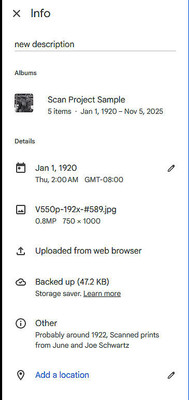 01 Google Photos Info Block
And in Flickr (below) title and caption came across and there is a place to add new comments but still no keywords.
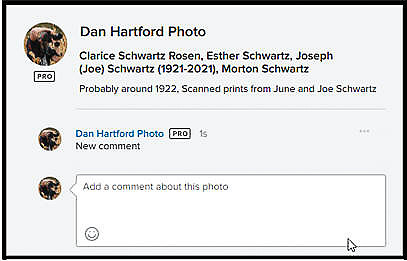 02 Flickr Info Box
Another solution for LrC users is to use the Adobe Share tool that comes free with your Adobe Plan and is built into LrC. With this option you can create a web page for each LrC Colleciton and invite specific people to view and comment on those images in which case their comments flow directly back into LrC. See https://www.danhartfordphoto.com/blog/2025/11/lr028-sharing-lrc-collections-on-the-web-with-feedback for the details of how to set this up and make it work. This solution shows titles and captions, file name, and user supplied comments and likes come directly back to LrC but still no keywords
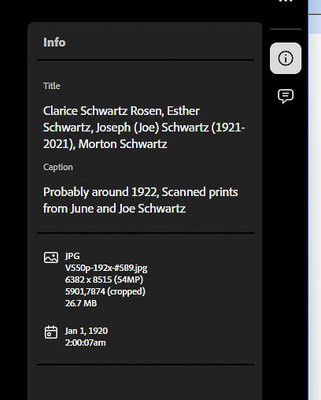 26 LR shared Page
The one that worked best for me is Zenfolio along with the Zenfolio Publish Service plugin from jFriedl https://regex.info/blog/lightroom-goodies/zenfolio. This combination can display both the title and comments as well as the Keywords from LrC, Also can be configured to show some added metadata (in the Keywords section) that I told the plugin to include such as the actual folder name and file name. It will show comments already posted by others and allows viewers to add their own comments. You can configure Zenfolio to send you an email when new comments are added and those comments will be returned to LrC where they can be seen by you.
Here’s the info panel in Zenfolio that users would see:
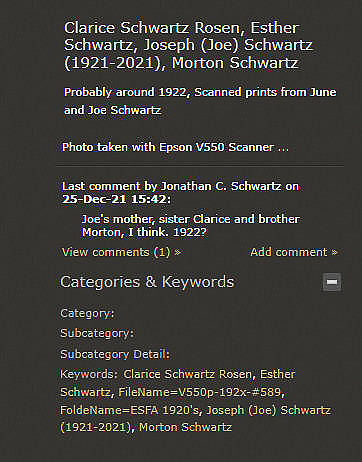 27 ZF Review
Notice that the title, caption, and comments from others appear. There is a button to add a comment and it shows the “will export” keywords. I set up the Zenfolio Publish Service plugin from Jfriedl to automatically add the file and folder names to the exported image. When someone added a new comment I got an email from Zenfolio and in LrC could bring that comment in with the click of a button or two. This worked very well for getting input from relatives.
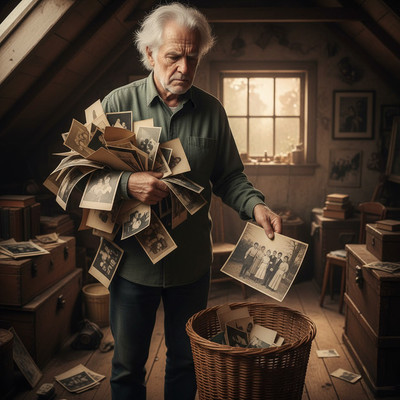
This question comes up all the time. Now that the film based images have been digitized and safely stored in digital format, should you keep the negatives, prints, and slides? I really don’t have a one size fits all answer for this.
 28 Toss or Keep
If you have an over abundance of caution you can certainly box them up and put them someplace to be passed on to future generations (I’m sure they will be thrilled to have to find a place in their cramped house with 3 kids, 2 dogs and a hamster to put a bunch of bins from great grand dad). If you go this route, be sure to label the bins as to where they came from and that they have been digitized.
On the other hand, now that they’ve been digitized keeping the originals is somewhat redundant and difficult to store if you care about preventing them from degrading over time. And, remember, if you keep them, your heirs will eventually inherit them with an implication that they should continue this preservation effort once you are gone and that may or may not be likely depending on the individuals involved. But as technology advances, perhaps some future heir may decide to re-do the scanning using technology not yet available to us.
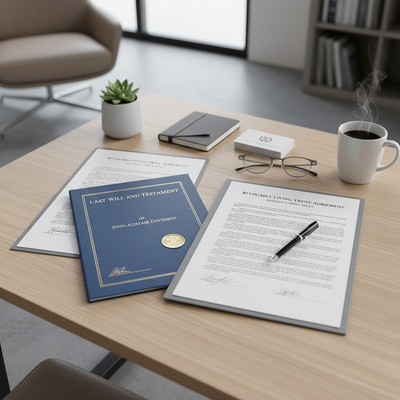
I have known some to write into their will or trust instructions as to who will inherit the prints, negatives and slides, how to access them, how they are to be maintained and what they are expected to do with them.
Now we come to sharing the results of your scanning project.
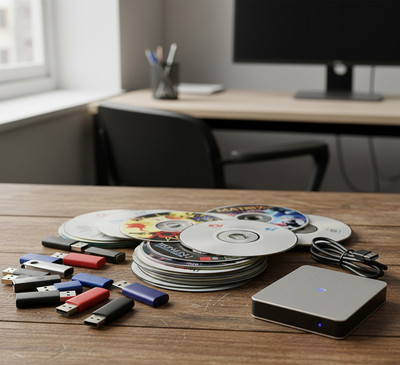
We already talked about file format and resolution so I won’t go into that again here. Exporting the edited and annotated images to some physical device like a thumb drive or burning them onto a DVD or CD is one method that works. But, it’s a ‘point in time’ extract which will have to be repeated if new images or new information shows up. But, for older recipients who are not all that internet literate this may be a valid approach. It also has the advantage of not relying on 3 party web sites which may require logging in or future subscription payments.
 29 CD's DVD's Thumb Drive's
But for most folks posting the images online is the preferred method of sharing these images. At this stage of the project, you no longer need a way for viewers to provide comments so this opens up the use of social media sites in addition to the popular photo posting sites like SmugMug, Flickr, Google Photos, Apple Photos, etc. You also have the option to use your Adobe “Share Collection” feature or the Adobe Portfolio program (which is also included in your plan) to create a web site or to create individual web pages for images you put in LrC collections. See https://www.danhartfordphoto.com/blog/2024/6/lr020-sharing-lrc-images-with-others for more on these and other options for sharing with others.
Now, here is where it gets complex.
When you pass on, in short order you name is added to a country wide database of people who have died (I’ll call it the ‘death database’). This database is used by financial institutions to immediately freeze all your accounts and access to your accounts (unless the account is in the name of a trust or is jointly owned by someone still living).
 30 access denied
Most social media sites and photo sharing sites also subscribe to this death database and will immediately shut off access to your accounts once you appear in the database. Some websites allow you to designate someone who will automatically be allowed to take over management of your account if you die which can help with this situation. But even in that case, if you really want your online DA (Digital Assets) to last more than a day or two after you pass on you should take action before you die (BTW this also should be considered for other web platforms like online banking).
In general you should put language in your Will and/or Trust documents listing the online accounts including and how to logon to them and explaining who each account should be given to. I am not a lawyer and am not providing legal advice here so please do your own research or consult with a lawyer or whoever helped you with your Will or Trust. Pay attention to the “Revised Uniform Fiduciary Access to Digital Assets Act (RUFADAA)”.
 32 Will and Trust
Here’s a short FAQ page from the American Bar Association https://www.americanbar.org/groups/real_property_trust_estate/resources/estate-planning/digital-property/. And Google or AI Chatbot searches can lead you to more info if you can separate fact from fiction.
But is that enough? If you want your heirs to take over your LrC catalog and images, will they know how to logon to your computer and then know how use LrC enough to transfer your trove of saved images to their own devices? I know my heirs won’t have that skill and will probably be swamped with all the other more important things that will be on their plate relating to my passing at that time. I suspect that once my wife and I go, my computer and disk drives will just be disposed of in an estate sale or a junk hauler will cart them away along 99% of our other possessions. But if you want to pass your catalog and images down the line, you need to leave instructions for how to do that. So let’s see if we can find a better way.
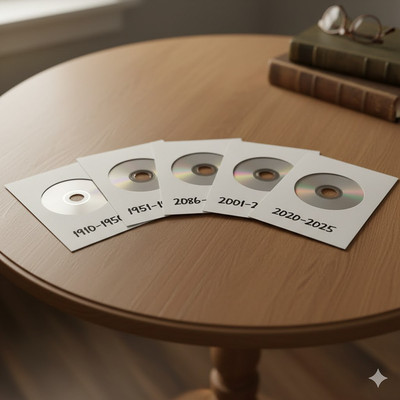
The first option is to save these family archive images as Jpg’s (with your edits and notes) on some physical media like a CD or DVD, flash drive, or some sort of USB SSD and specifically bequeath the media and devices to specific named people. Again, leave instructions as to where this media will be found and how to access it.
Let’s start with CD’s and DVD’s. I think this horse is nearing the end of its last race. New computers don’t even come with built in CD/DVD drives anymore. You can still buy external CD/DVD drives but these will fade away in the blink of an eye. So, for right now burning them onto such disks may be OK if you plan to die soon but are not practical for the long term.
 38 DVD's
So, what about an External Hard Drive or SSD? Well, these are still quite viable. Files systems on these devices (NTFS, APFS, FAT32, exFAT, Etc.) will continue to evolve over time but if you pick a format like exFAT which is compatible with both Mac’s and PC’s it should be usable for quite some time.
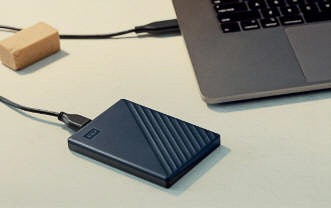 37 EHD
Now we come to long term online archiving after you are gone. The options here are the same as we discussed in the “Involving others in your Project” section. But once you’ve finished the project, you no longer need to worry about viewers being able to add information to images and this opens up options like social media sites or image sharing sites.
The fly in this ointment is the legal ownership of these online accounts after you go which we talked about above. With this option though there is an expectation that one of your heirs will assume the responsibility to
- transfer the site to themselves
- maintain the site as required due to platform changes, and
- continue to pay license or subscription fees required to keep the account operational.
In this model, depending on the platform, this may include not only the platform itself (Zenfolio, SmugMug, Flicker, Etc.), but also there may be a web hosting company (e.g., GoDaddy, Amazon Web Services, Etc.), and a company through which you registered a web domain name. Then there is other SW which may be needed to maintain the site such as WordPress or various plugins which should also be kept current by your designated heir. All of this (whatever it turns out to be) needs to spelled out in detail in your Estate documents (Will and/or Trust) or referenced in those documents.
And, the last thing I’m going to say about saving this data for future generation’s is to not leave it as a surprise for your heirs to first hear about it from your lawyer after you pass away.
 31 Reading the will
Well before you can no longer do it, go over all of this with whoever it is you expect to take over responsibility for it. Let them know your expectations and where to find all the needed stuff like those DVD’s or account name and password lists and what subscriptions or fees they are expected to maintain.
- Refrain from using generic relationship words such as “Dad” or “Aunt” as those sorts of words are relative to you. Your “dad” is some else’s “son” or “brother” and 50 years from now the word “dad” will be meaningless. However if you qualify it then it’s OK. For example “Bob Dunk’s Dad” or “Fred Jones Brother”
- Don’t let ‘perfect’ get in the way of ‘good’.
- Think in terms of 2 or 3 generations down the road. One way to do that is to think about images you might of inherited from your parent who inherited them from their parents. What sort of images from that long ago time would be of interest to you and what information would you want to have pertaining to each image. Remember, you will have very little or any recollection of faces or places from that era. That should be your guide as to what your great grandchildren would like to get from you.
Even though this was a lengthy article I left out almost as much as I put in. The intent was to give you a road map of things to consider and some possible solutions.
For some folks, taking a photo of the images in the pile with their phone and posting them on Facebook or Instagram with no accompanying information is good enough. But for most people who embark on a scanning project they want something a bit more formal and almost certainly longer lasting - and I hope that’s what you got from this article.
You’ve made it to the end of this long article. I hope you found it informative and useful and that it addressed whatever it was that led you here. If you’ve stumbled upon any errors, omissions, or things that could be presented better, please let me know by leaving a comment.
You may have noticed as you read through this article that you were not required to logon or to create an account. I did not ask for a credit card number. You did not have to provide an email address or phone number. You were not bombarded with pop up ads. I did not lure you part way into the article and then tell you to pay for a subscription to get the rest.
Nobody paid me to write this article. I have no sponsors. I have no advertisers. I spend many, many hours (days. weeks or months) researching, testing, and writing articles such as this one to help folks such as yourself and to attract people to my web site where they may be inclined to utilize my one-on-one Lightroom Classic Training or Lighroom Help consulting services.
So, I am going to ask you for a favor. Please spend a few minutes and leave a thoughtful comment. That’s it! If you feel especially motivated also post a review on Google and/or Yelp for “Dan Hartford Photo”. Free to you, very helpful to me. To leave a comment without having to register, send it to me via the "Contact+About" menu and I'll post it for you (include the blog number or name).
